What this is, and how to read it
Chapter 01: Introduction
Most cooking apps start from recipes and leave you to discover you’re missing half the ingredients. KitchenBuddy starts from the other end. It asks one question, “What can I cook right now with what I already have?”, and answers it from a structured record of your pantry, how fresh each thing is, and a few signals you control.
This is a working prototype, not a launched product. It runs entirely in the browser: pantry data is saved on your device, product lookups use Open Food Facts, and weather comes from Open-Meteo. No user research or usability testing has been carried out yet. The chapters on research and testing are therefore plans and hypotheses, and they are labelled as such. Every claim carries one of these labels:
From a broad issue to a specific design problem
Chapter 02: The problem space
Food waste is a large, well-documented problem. The everyday decision that produces it — “what do I make tonight?” — is much less studied, and that decision is where an interface can actually help.
Scale (published evidence)
UN News, reporting UNEP’s Food Waste Index Report 2024, states that 1.05 billion tonnes of food went to waste in 2022, and that households account for 631 million tonnes, “up to 60 per cent” of the total.[1]
Global modelled estimate; not specific to the target users.
Not just a rich-country issue
The same coverage reports that average household food waste in high-, upper-middle- and lower-middle-income countries differs by just seven kilograms per person per year.[1]
Supports studying Indian households directly rather than borrowing Western assumptions.
“Not used in time”
WRAP’s UK analysis estimated 2 million tonnes of household food discarded because it was not “used in time”; about half was thrown away whole or unopened, and passing a date label triggered disposal in a third of cases.[2]
UK, 2012 data. Used only to form hypotheses.
Broad problem space
Around a small household kitchen, several frictions plausibly stack up. Each is a hypothesis to examine, not a finding:
- Decision fatigue — deciding what to eat, every day, with limited energy.
- Poor visibility — not knowing what is in the fridge or the back of the shelf.
- Forgotten dates — remembering food exists is different from remembering when it goes off.
- Repeat purchases — buying what you already have.
- Recipe mismatch — recipes that assume ingredients you don’t own.
- Fragmented tools — pantry notes, recipe sites and shopping apps that don’t talk to each other.
Research on household food waste warns against single-cause explanations. Quested et al. describe the relevant behaviours as more complex than existing behavioural models allow.[3] That argues against a one-feature fix, such as expiry reminders alone, and for designing around the moment of decision.
The specific problem KitchenBuddy addresses
Problem statement (draft)
People who cook for themselves in small households often own enough food for a meal but lack a quick, trustworthy way to see what they can make with it. So they default to buying more, ordering in, or letting fresh ingredients expire unnoticed.
Design hypothesisScope. In scope: one person or a small shared kitchen, everyday Indian home cooking, and the moment of deciding and cooking. Out of scope for now: nutrition tracking, grocery price comparison, and restaurant ordering.
What I would do, and why — no primary research has been done yet
Chapter 03: Research plan
| Method | Why appropriate | Question it investigates | Evidence it produces | How it would change design |
|---|---|---|---|---|
| Secondary research | Cheap, fast grounding in what is already known | What drives household food waste? What is known about date labels and planning? | Annotated literature map with geography and date limitations | Frames hypotheses and avoids reinventing known findings |
| Competitive analysis | Many apps already exist in this space | Which jobs are already well served? Where are the gaps? | Verified feature matrix and positioning map (Chapter 04) | Focuses the MVP on an under-served combination, not on feature parity |
| Contextual inquiry (kitchen tours) | Food is physical; people misremember what they have | What is actually in kitchens? How are things stored and found? | Photos (with consent), inventory vs. recall comparison | Catalogue design, default units, categories, where friction sits |
| Diary study (7–10 days) | Meal decisions and waste happen across days, not in one session | When and why do decisions stall? What gets thrown away, and why? | Daily entries: meals, purchases, discards, reasons | Validates or kills the “not used in time” hypothesis for this audience |
| Semi-structured interviews | Explains the why behind the diary entries | Habits, workarounds, trust in dates and apps | Coded transcripts → affinity map → insights | Personas, JTBD, design principles |
| Task analysis | Breaks “decide and cook” into steps that can be measured | Which steps take time or cause errors today? | Hierarchical task model with timings | Flows (Chapter 09) and usability metrics (Chapter 15) |
Recruitment (proposed)
- 6–8 participants: students in hostels or PGs, and young professionals in rented flats.
- A mix of people who cook most days and people who rarely do.
- At least two who share a kitchen.
- Informed consent; kitchen photos only with permission, and no faces.
Analysis (proposed)
- Code diary entries by trigger (forgot, no time, no idea, missing ingredient).
- Affinity-map interview notes into behaviours, needs and workarounds.
- Compare what people say they own with what their kitchen tour shows.
Interview guide
Neutral and open-ended. It asks about past behaviour rather than hypothetical wishes, and never mentions the app.
- Walk me through the last time you decided what to eat at home. Where were you, and what happened first?
- How do you usually find out what food you have at the moment?
- Tell me about the last time something in your kitchen went off before you used it. What happened?
- How do you decide when something is too old to eat?
- When you shop for groceries, how do you decide what to buy? What do you check beforehand, if anything?
- Tell me about a time you bought something you already had at home.
- Where do you look for cooking ideas? What makes an idea useful or useless to you?
- What does a “good enough” weeknight meal look like for you?
- What tools, notes, lists or apps do you use around food today? What do you like and dislike about them?
- If you share a kitchen, how do you and the others keep track of food and groceries?
- How do cost, time and health trade off when you choose what to cook?
- Is there anything about managing food at home we haven’t talked about that matters to you?
Verified from official listings, October 2026
Chapter 04: Competitive analysis
Pantry tracking, expiry reminders and “recipes from what you have” all exist already. The opportunity is not a missing feature. It is a lighter, explainable answer to tonight’s question.
Each row is based on the developer’s own App Store listing or official page (sources 4–10). “Not described” means the listing does not mention it; it does not mean the product lacks it.
| Product | Value proposition | Core workflow | Pantry awareness | Expiry | Recommendation logic | Shopping | Opportunity for KitchenBuddy |
|---|---|---|---|---|---|---|---|
| SuperCook[4]Recipe discovery by ingredient | Recipes that use ingredients you already have | Tick ingredients from 2,000+ in categories (or dictate) → browse matching recipes | Yes — user-selected ingredient list | Not described in listing | Shows recipes that require only selected ingredients | Not described in listing | Proves the “start from what you have” model; KitchenBuddy adds freshness priority and quantities. |
| NoWaste[5]Pantry & expiry tracking | Inventory lists for freezer, fridge & pantry with expiry reminders | Scan barcode / receipt / photo → item list → reminders | Yes — locations incl. custom ones | Yes — reminders before food goes off | Recipes, meal plans and lists are present; ranking logic not described | Yes — multiple lists | Strong tracking; the open question is turning tracking into tonight’s decision. |
| KitchenPal[6]Pantry & shared groceries | Pantry manager linked to recipes and shared grocery lists | Scan barcode (4M+ product library) → pantry sections → recipes / lists | Yes — sections for pantry, fridge, freezer and more | Yes — manual dates, auto-detected for some fresh items; alerts | “Recipes which match your existing food inventory” | Yes — shared in real time | Closest overall; KitchenBuddy differs in explaining *why* a meal is suggested and in local context. |
| Samsung Food[7]Recipes, planning & AI | Save recipes from anywhere, plan meals, build shared shopping lists | Save / search recipes → plan week → shopping list → (optional) retailer delivery | Automated pantry management is a paid (Food+) feature | Not described in listing | AI meal plans tailored to health goals (paid) | Yes — shared, with integrated retailers in some regions | Recipe-first and feature-rich; KitchenBuddy tests a lighter, pantry-first entry point. |
| Mealime[8]Meal planning | Weekly personalised meal plans with auto-generated grocery lists | Choose diet & plan → recipes → grocery list | Not described in listing | Not described in listing | Plan-based | Yes — generated from plan | Plan-first reduces waste by buying to a plan; listing states the service shuts down 21 Oct 2026. |
| Too Good To Go[9]Food-waste marketplace (adjacent) | Buy surplus food from nearby businesses at a discount | Browse map/list → reserve & pay → collect in a pickup window | No — retail surplus, not home inventory | n/a | n/a | Purchase of “Surprise Bags” | Shows waste reduction can feel rewarding, not guilt-driven. Different stage of the food chain. |
| Blinkit[10]Quick commerce (adjacent, India) | Groceries and essentials delivered to the doorstep | Search → cart → fast delivery | No home inventory described | n/a | n/a | Core purpose | Hypothesis: when re-buying is this easy, checking what you already own is the skipped step. |
Evidence → behaviour → need → opportunity
Chapter 05: Behaviour & pain points
| Evidence | Behaviour | Underlying need | Design opportunity | Status |
|---|---|---|---|---|
| WRAP: much discarded food was “not used in time”; date labels triggered a third of disposals (UK)[2] | Food is bought with intent, then forgotten until it is past saving | Notice the right item at the right moment, not just get an alarm | Put expiring items inside the meal suggestion itself | Published (other context) |
| Hypothesis — to verify through kitchen tours | People decide what to cook from memory, not inventory | See what is possible without checking every shelf | Show coverage (“5/5 in your pantry”) on every recipe | Design hypothesis |
| Hypothesis — to verify through the diary study | Recipe apps send people shopping for one missing item, or the plan is abandoned | Recipes that fit what’s here, or know exactly what’s missing | Rank by coverage; one tap adds the missing items to the list | Design hypothesis |
| Hypothesis — supported by the volume of tools in Chapter 04 | Pantry lists, recipe sites and shopping apps live in separate places | One loop from what I own → what I cook → what I buy | Cooking updates the pantry, and bought items move into it | Design hypothesis |
| Hypothesis — Blinkit-style quick commerce makes re-buying easy[10] | Buying more is easier than checking what’s at home | Checking must be faster than ordering | Make “what can I cook” the first thing on the home screen | Design hypothesis |
Design hypothesis Journey based on desk research and the product brief; the diary study would replace the “likely friction” row with observed data.
Provisional — built from the target-user hypotheses
Chapter 06: Personas & jobs to be done
Primary · The working solo cook
Mid-20s, first job, rented 1BHK or shared flat in a metro, cooks 3–4 nights a week.
- Goals: eat home food cheaply, not waste what was bought on Sunday.
- Behaviours: shops weekly plus quick-commerce top-ups; cooks a rotation of 6–8 dishes.
- Frustrations: finds wilted coriander and sour milk; recipe sites assume an oven.
- Workarounds: asks family on WhatsApp; orders in when undecided.
- Constraints: one burner or induction, small fridge, 20–30 minutes on weeknights.
- Wants: one good idea, now, from what’s already there.
Secondary · The PG / hostel student
19–22, shared kitchen or kettle and induction only, tight budget.
- Goals: cheap late-night food, little cleaning.
- Behaviours: buys small quantities; shares staples with roommates.
- Frustrations: food “disappears” or expires in shared spaces.
- Constraints: limited appliances; may not own a pressure cooker.
- Wants: ideas that work with a kettle or microwave.
Jobs to be done (drafts)
- When I need to make a meal with limited time and ingredients, I want to see what I can realistically cook, so I can decide without buying more or wasting food.
- When I come back from shopping, I want to put things away in the app quickly, so my pantry stays accurate without becoming a chore.
- When something is about to go off, I want a concrete way to use it today, so it doesn’t end up in the bin.
- When I plan the week, I want to know exactly what to buy, so I don’t duplicate what I already have.
From discovery to principles
Chapter 07: Problem definition & opportunity
How might we
How might we help people cooking for themselves turn the food they already own into a confident meal decision in under a minute, while noticing what needs using first?
“Under a minute” is a target to test, not a result| Principle | Why it matters (evidence / hypothesis) | How it shows up in the prototype |
|---|---|---|
| Start with what the user owns | Recipe-first tools create the missing-ingredient trap (Ch. 05, hypothesis). | Every recipe shows pantry coverage; ranking rewards it. |
| Make deciding take less effort | The moment of decision is the lever (Ch. 02). | One recommended meal leads the home screen, with one primary action. |
| Show freshness without causing anxiety | Date labels drive disposal (WRAP, UK); alarms alone don’t create action. | Calm tones plus icons and words; expiry shows up inside meal suggestions, not as red alerts. |
| Explain every recommendation | Users can’t trust or correct what they don’t understand. | A one-line reason plus reason chips, all derived from the scoring. |
| Keep the user in control | Food is personal; automation errors are costly. | Pantry deductions are proposed, never silent; filters are explicit. |
| Make routine updates quick and forgiving | Stale data kills trust (Ch. 05). | −/+ on every row, undo on removal, “added by mistake” is not counted as waste. |
| Help avoid unnecessary purchases | Duplicate buying (hypothesis). | Shopping list skips items you already own; plans compute only what’s missing. |
User needs
- Know what’s possible tonight
- See what needs using first
- Keep the pantry accurate cheaply
- Shop only for what’s missing
Constraints
- No backend in the prototype (browser storage only)
- Barcodes identify products but carry no expiry date
- Weather and location may be denied or unavailable
- Small screens, often used while cooking
Success criteria (to measure)
- Participants pick a meal faster than with their current method
- Participants can explain why a meal was suggested
- Pantry stays accurate after cooking
- Fewer items logged as thrown away over time
One loop, five destinations
Chapter 08: Product strategy & information architecture
KitchenBuddy is organised around a loop rather than a set of tools: the pantry feeds suggestions, cooking updates the pantry, and shopping refills it.
Value proposition
Know what you can cook tonight from what you already have, and use things before they go off, with explanations you can check and correct.
Navigation model
Mobile: a bottom bar with Kitchen, Pantry, a central Add food button, Recipes and Plan; Shopping and Profile sit in the header. Desktop: a top bar. Recipe, item, add-food and cook mode open as sheets over any screen, so a task never strands you on a new page.
The brief’s “Discover” lives on Kitchen (home) and Recipes; there is no separate Discover tab, to keep the bar to five items.
| Capability | Status in this build | Notes |
|---|---|---|
| Pantry: add, edit, search, filter, use up, throw away, undo | Implemented | Grouped by freshness; −/+ per row |
| Barcode scan + product lookup | Implemented | Camera via BarcodeDetector / ZXing; Open Food Facts lookup straight from the browser |
| Expiry entry | Partially implemented | Manual or typical-shelf-life estimate, labelled; OCR removed from v1 because it was simulated |
| Meal recommendations | Implemented | Explainable rule-based ranking (Ch. 10); no machine-learning model |
| Cooking mode + pantry update | Implemented | Unit-aware proposals, user confirms |
| Shopping list ↔ pantry | Implemented | Missing items in; bought items out to pantry |
| Weekly plan | Implemented | 7 days × 3 meals, shop for the plan |
| Context: time, location, weather | Implemented | Open-Meteo; city or permission-based GPS; graceful fallback |
| Persistence | Partially implemented | Browser localStorage + cross-tab sync; no accounts or cross-device sync |
| Allergies, multi-user, OCR, receipt import | Future scope | See roadmap (Ch. 16) |
Six flows, adapted to what the build actually does
Chapter 09: User flows & interaction design
Implemented All six flows were run end to end in the build on 14 Oct 2026 by an automated browser script (Chapter 13). That shows they work technically. It is not evidence that people find them usable.
A · Discover a meal
Intent: decide what to eat now. Entry: open the app (Kitchen).
- ScreenKitchen: greeting, time, city, weatherContext is shown, not hidden
- SystemRank recipes from pantry + signalsExpired food never counts
- ScreenTonight’s pick + one-line reason“Uses your paneer and tomatoes before they go off in 2 days.”
- DecisionDoes it suit me?Yes → Start cooking or See recipeNo → Filter chips (≤15 min, Comfort, Light…) re-rank
- OutcomeCook mode opensFeedback: progress bar, pet watches
B · Add a pantry item
Intent: record food quickly. Entry: centre + button or Pantry → Add / Scan.
- User actionQuick pick from catalogue, or Scan
- DecisionBarcode found in Open Food Facts?Yes → Name, brand and pack size pre-filledNo → “Isn’t in Open Food Facts yet — we won’t guess.” Add by name
- ScreenCheck details: quantity, unit, expiryTypical shelf life pre-selected and labelled “estimated”
- DecisionPrinted date known?Yes → Enter it → labelled “from the pack”No → Keep estimate, editable later
- OutcomeSaved; toast + pet sniffsDuplicates with the same date are merged
C · Use an expiring ingredient
Intent: rescue something before it goes off. Entry: Use-these-first shelf, pet tip, or Pantry.
- ScreenItem sheet (e.g. Paneer · 2 days left)
- Screen“Use it in” recipe chipsOnly recipes the user can make
- User actionOpen recipe → Start cooking
- OutcomeMarked “rescued” in the update stepCounted in Profile → Your impact
D · Update the pantry through cooking
Intent: keep the inventory true without data entry.
- ScreenCook mode: one step per screen, optional timers
- User action“I’ve finished cooking”
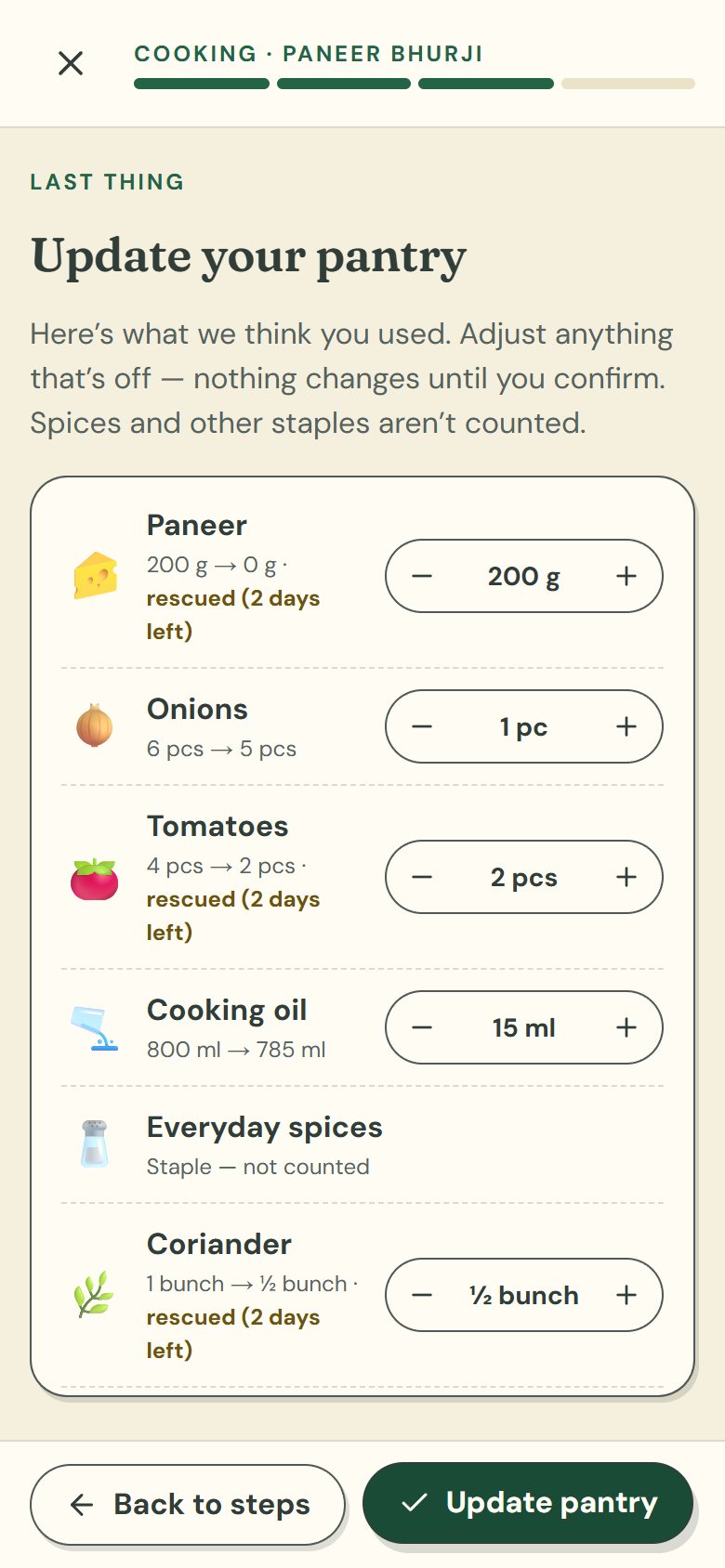
- SystemPropose deductions in each item’s own unit1 tbsp oil → 15 ml; spices not counted
- DecisionProposed amounts right?Yes → Update pantryNo → Adjust with − / +, then update
- OutcomePantry, history and stats updatedUsed-up items offer “Add to list”
E · Build a shopping list
- User action“Add N to list” on a recipe, or “Shop for this plan”
- SystemOnly missing or low items; no duplicates
- User actionTick items in the shop
- Outcome“Put N away in pantry”Added with estimated dates, flagged for checking
F · Contextual recommendations
- ScreenCity chip on Kitchen → location sheetExplains why location is asked for
- DecisionAllow device location?Yes → GPS → reverse-geocoded city nameNo → Pick a city from the list
- SystemFetch Open-Meteo weather
- Error / recoveryPermission denied or network failureMessage shown; app keeps working, weather left out of ranking
- OutcomeWeather becomes one small signal (+10)
Decision support, not a chatbot
Chapter 10: AI interaction design
The current recommender is a transparent, rule-based ranking: deterministic, testable and fully explainable. It is the right baseline before adding a language model, because every explanation it gives is literally true.
1 · Inputs
- Pantry items, quantities, dates
- Diet, appliances, dislikes
- Time of day → meal type
- Weather (if available)
- Mood / time filter (if chosen)
- Favourites
2 · Hard constraints (filter out)
- Diet not allowed
- No compatible appliance
- Contains a disliked word
- Over the chosen time limit
- Doesn’t match the chosen mood
- Expired items never count as available
3 · Soft signals (score)
- coverage × 60
- − 12 per missing item
- + 15 if fully cookable
- + 30/24/18/12 per item expiring in 0/1/2/3 days (max 60)
- + 10 weather match
- + 10 meal-type match
- + 4 favourite
4 · Explanation
- Headline from the strongest signal
- Reason chips from the same trace
- Coverage “5/5 in your pantry”
- Missing items named
Implemented Weights as written in src/lib/recommend.ts. They were set by judgement and are untested; tuning them is part of the validation plan.
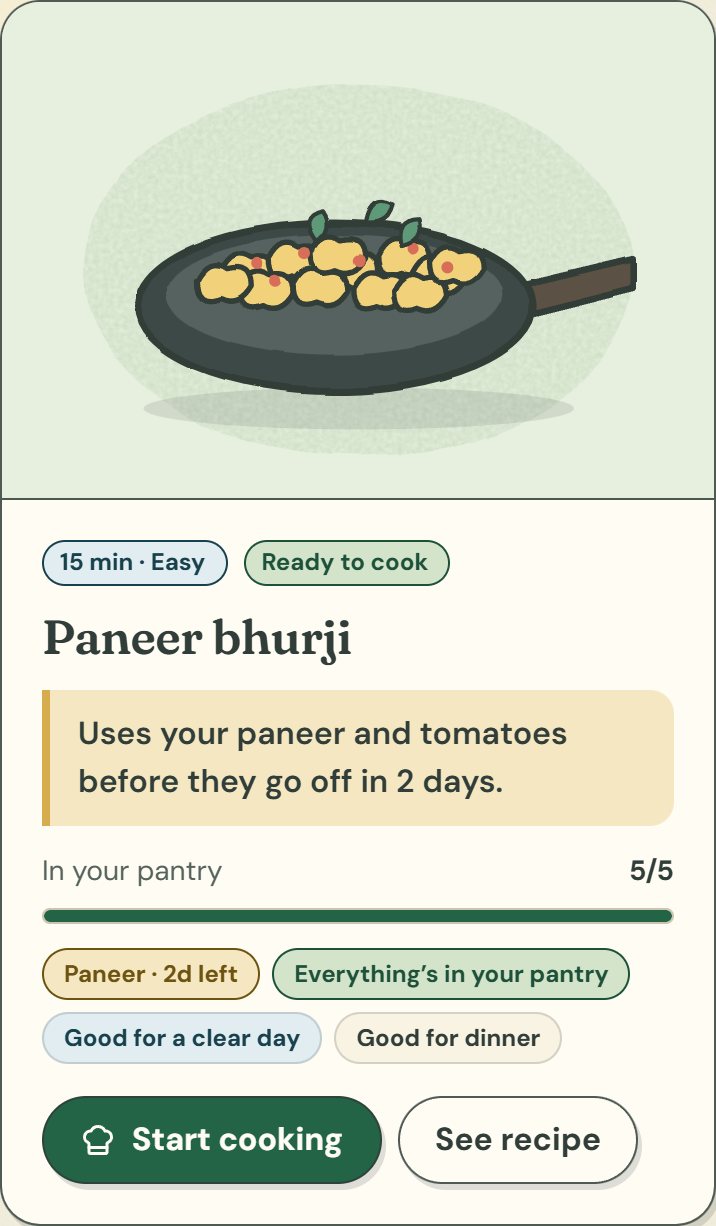
- Effort and readiness first: time, difficulty, “Ready to cook”.
- One-sentence reason generated from the strongest signal (expiry here).
- Coverage meter: how much of the recipe you already own.
- Reason chips: the same scoring trace, broken out.
- One obvious next action; “See recipe” for people who want to check first.
Constraint order
- Safety and identity: diet (and allergies, once added) always override.
- Feasibility: appliances, then availability.
- Urgency: food that is expiring.
- Fit: meal type, mood, time.
- Context: weather is a nudge (+10), never a rule. A rainy day doesn’t force pakoras on someone who has paneer to use up.
Responsible AI commitments
- Never invents pantry contents, products or weather. If weather fails, it says “Weather unavailable”.
- Infers nothing sensitive; preferences are only what the user sets.
- Every suggestion is optional; deductions need confirmation.
- Users can correct inputs: dates, amounts, dislikes, appliances.
- Estimated dates are labelled as estimates everywhere.
Roadmap
Future scope Variety control (don’t suggest the same dish three nights running), explicit allergies, and an LLM that rewrites the explanation in friendlier language. It would only be allowed to restate the scoring trace, never to add claims of its own.
Warm, hand-drawn, food-first — specimens rendered from the live components
Chapter 11: Visual design system
The look is borrowed from SpinCycle, an earlier project in the same portfolio: cream paper, ink outlines with a slight hand-drawn wobble, pencil hatching and printed offset shadows. Here it is re-cut for a kitchen. Hand-drawn dishes replace stock photos, which keeps every recipe visually consistent and avoids images that don’t match the dish.
--forestPrimary actions, active nav--sage-lightFresh / available--creamPage background--paperCards, sheets--coralAdd food, warmth, hearts--mustard-washUse soon--coral-washExpired--tealDemo banner, deep accent--inkText and outlinesTypography
Fraunces — headings
DM Sans — interface and body text, 16 px base, 1.5 line height.
Fluid heading sizes; eyebrows in tracked uppercase (12 px).
Freshness — colour + icon + words, never colour alone
Buttons & chips
Pill shapes, 1.5 px ink border, 2×3 px printed shadow that lifts on hover and presses on tap. Minimum 44 px targets.
Illustration system
Dishes are built from a small spec (vessel, food shape, colours), so new recipes get art without a designer.
Spacing & shape
A 4 px base scale (4–48). Radii of 8, 14 and 20, plus full pills for buttons. Content width 1180 px.
Motion
Tail wags, steam, rain on the window and sheet transitions are short and spring-eased. Everything stops under prefers-reduced-motion.
Accessibility
Visible focus rings, focus-trapped dialogs that return focus, live-region toasts, labelled controls, and alt text on every illustration. Contrast audit pending
On the Zomato reference
I took the principles, not the look: strong hierarchy, one dominant card, scannable chips and search near the top. The palette, illustrations and components are original.
Problem → decision → rationale → benefit
Chapter 12: Key screens & design decisions
All screens are real captures of the prototype at 390 × 844 (phone), taken on 14 October 2026 with the sample pantry loaded.
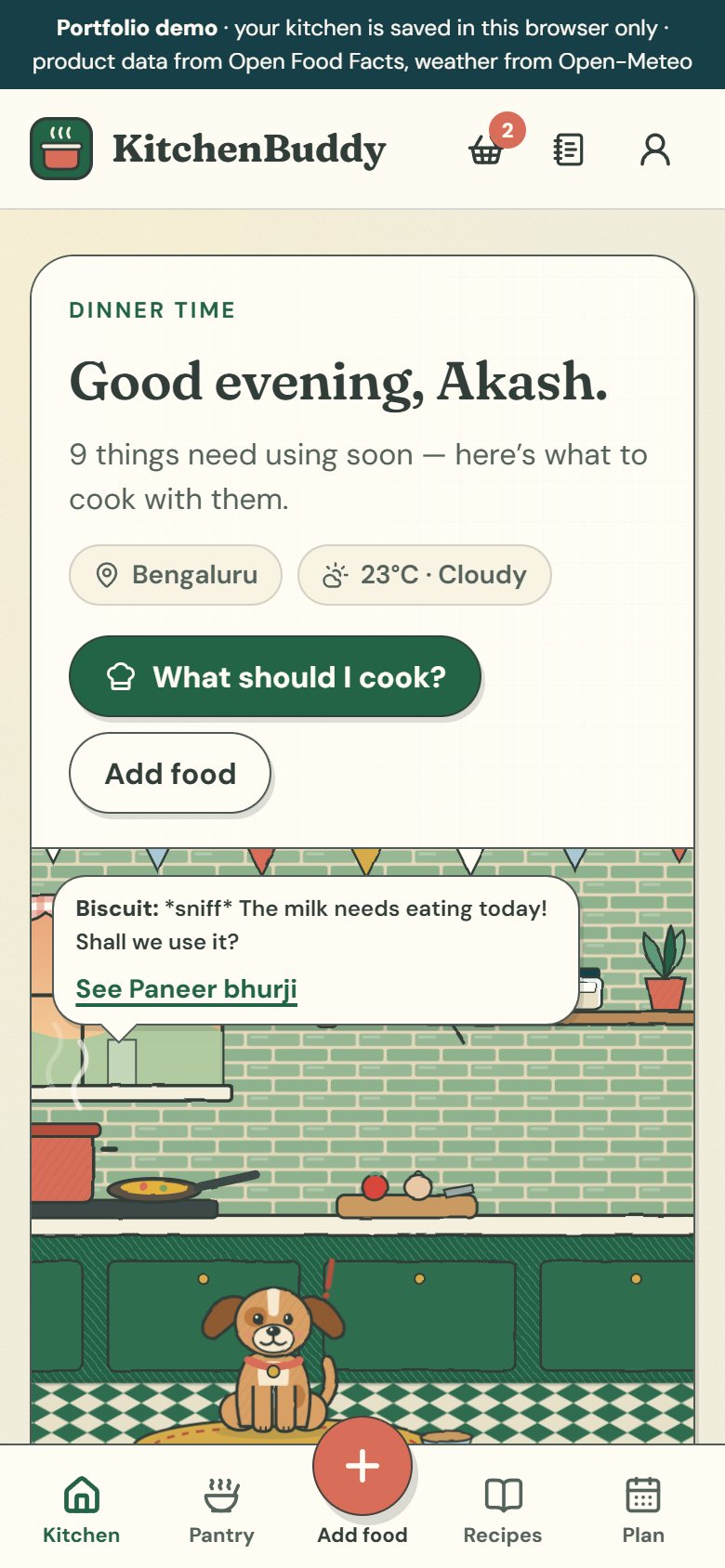
Home & contextual greeting
- Problem
- Opening a food app usually means choosing where to start.
- Design decision
- Greeting + one sentence of status + the companion with the single most urgent tip.
- Interaction rationale
- Context (time, weather, what’s urgent) is visible before any action.
- Expected benefit
- The next step is suggested before the user has to ask. Expected, not measured
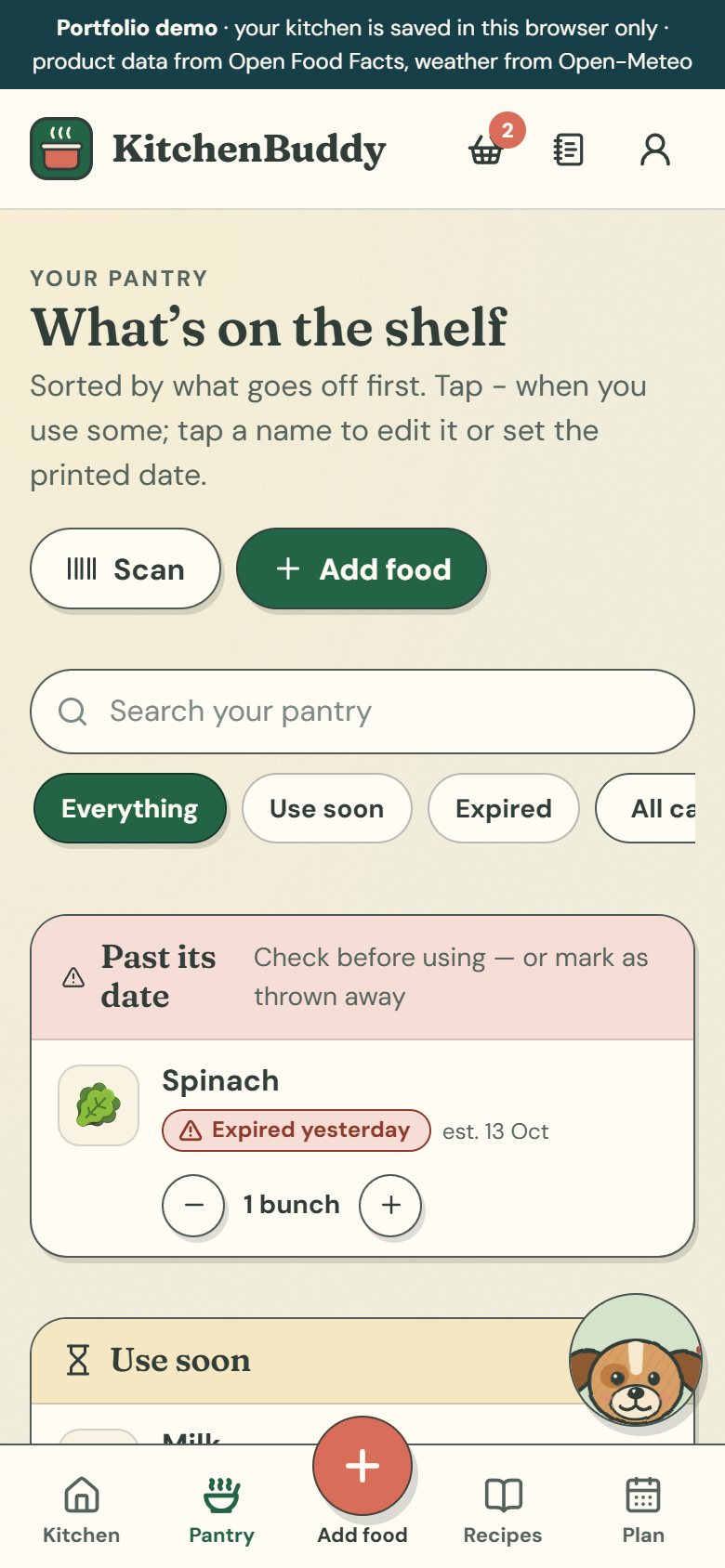
Pantry overview
- Problem
- A flat list hides what matters.
- Design decision
- Group by Past its date → Use soon → Fresh; −/+ on every row.
- Interaction rationale
- Sorted by urgency, and updating takes one tap where the item already is.
- Expected benefit
- Less effort to keep the data true. Expected, not measured
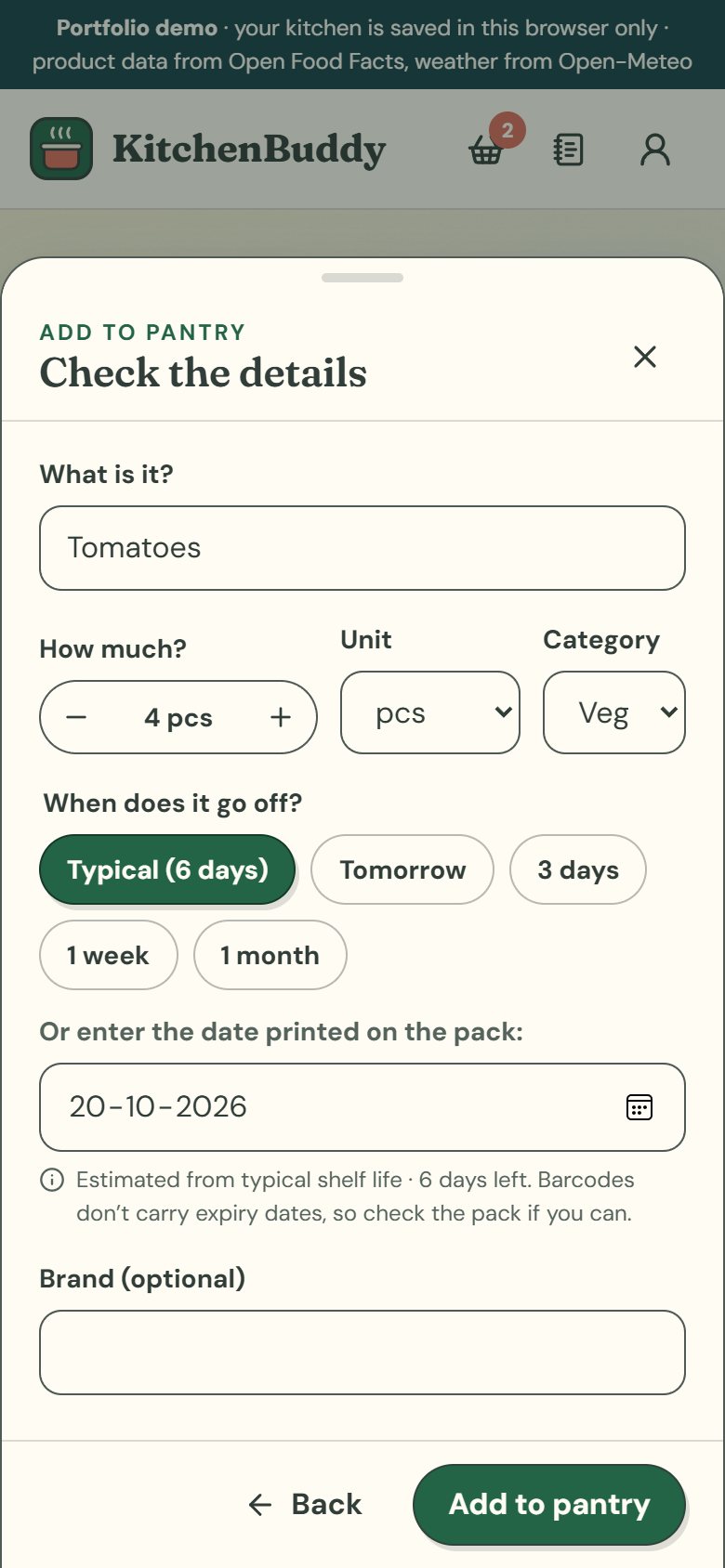
Add item & expiry
- Problem
- Expiry entry is the most tedious part of tracking.
- Design decision
- Typical shelf life pre-selected; one tap for common spans; printed date optional.
- Interaction rationale
- Good enough by default, precise when it matters, and always labelled.
- Expected benefit
- Adding takes two taps without pretending to know the real date. Expected, not measured
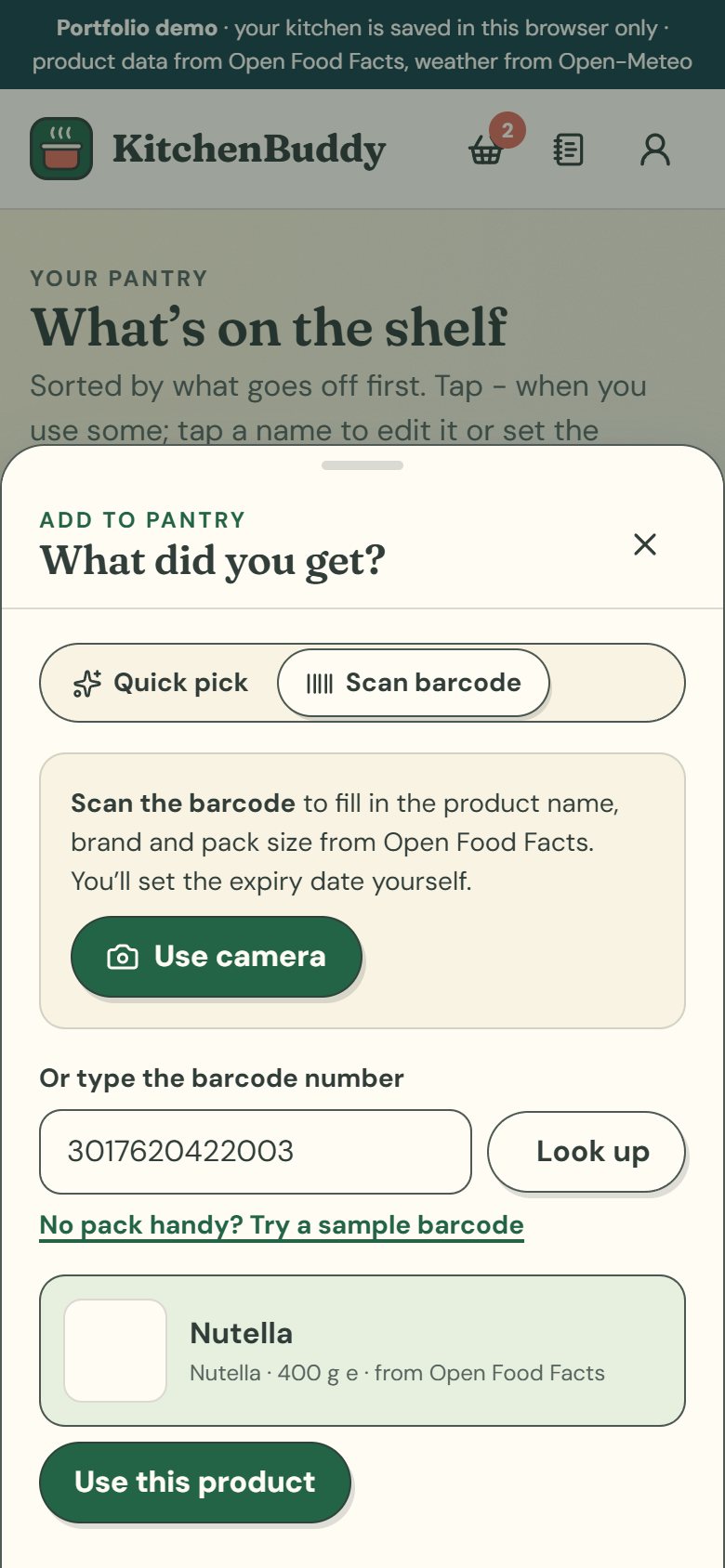
Barcode scan & product confirmation
- Problem
- Product data from barcodes is often wrong or missing.
- Design decision
- Show the source (“from Open Food Facts”) and ask for confirmation before using it.
- Interaction rationale
- Identification and expiry are separate jobs, and the barcode only does the first.
- Expected benefit
- Faster entry without hidden guesses. Expected, not measured
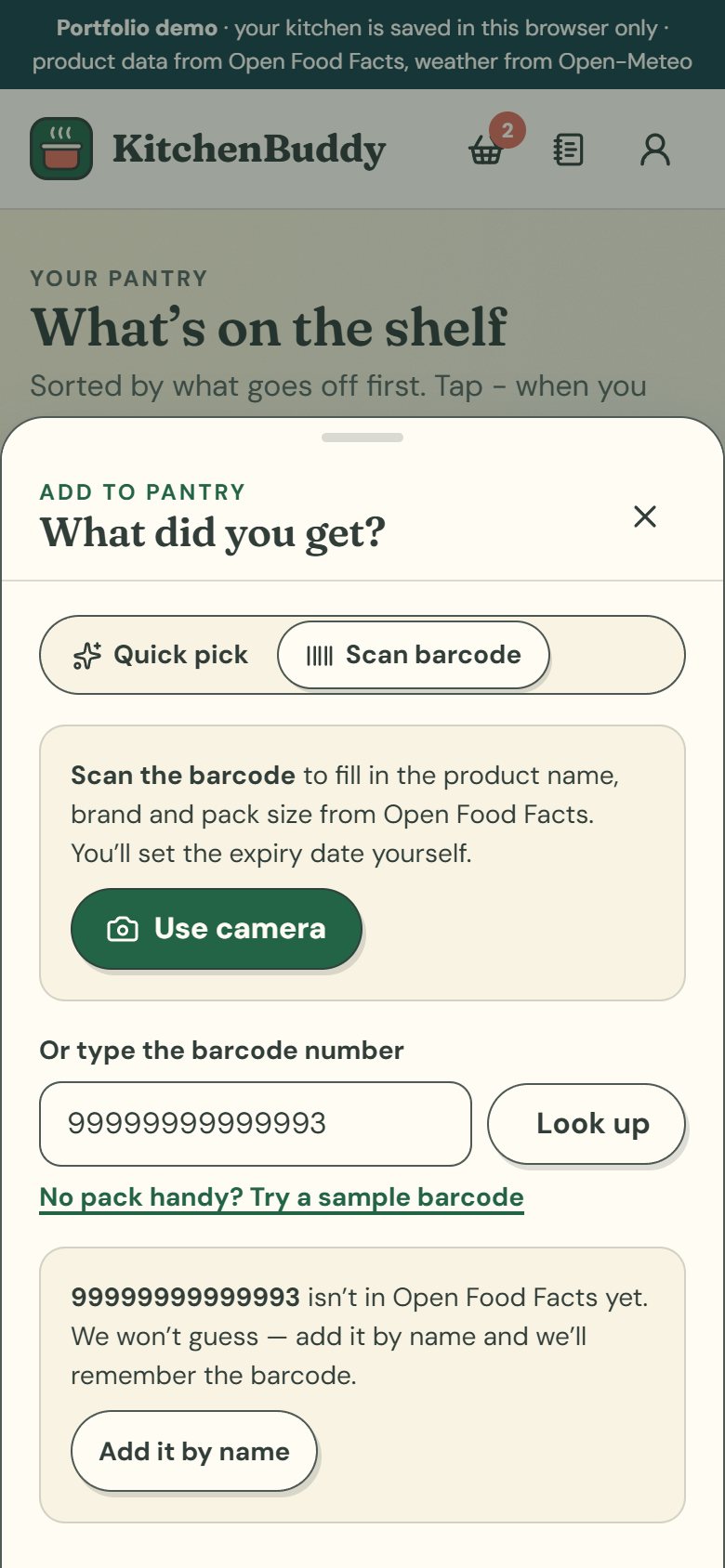
Error state: unknown product
- Problem
- v1 returned invented products for test barcodes.
- Design decision
- Say plainly that it isn’t found, and keep the barcode for a manual entry.
- Interaction rationale
- Never invent product information.
- Expected benefit
- Trust in the data that does appear. Expected, not measured
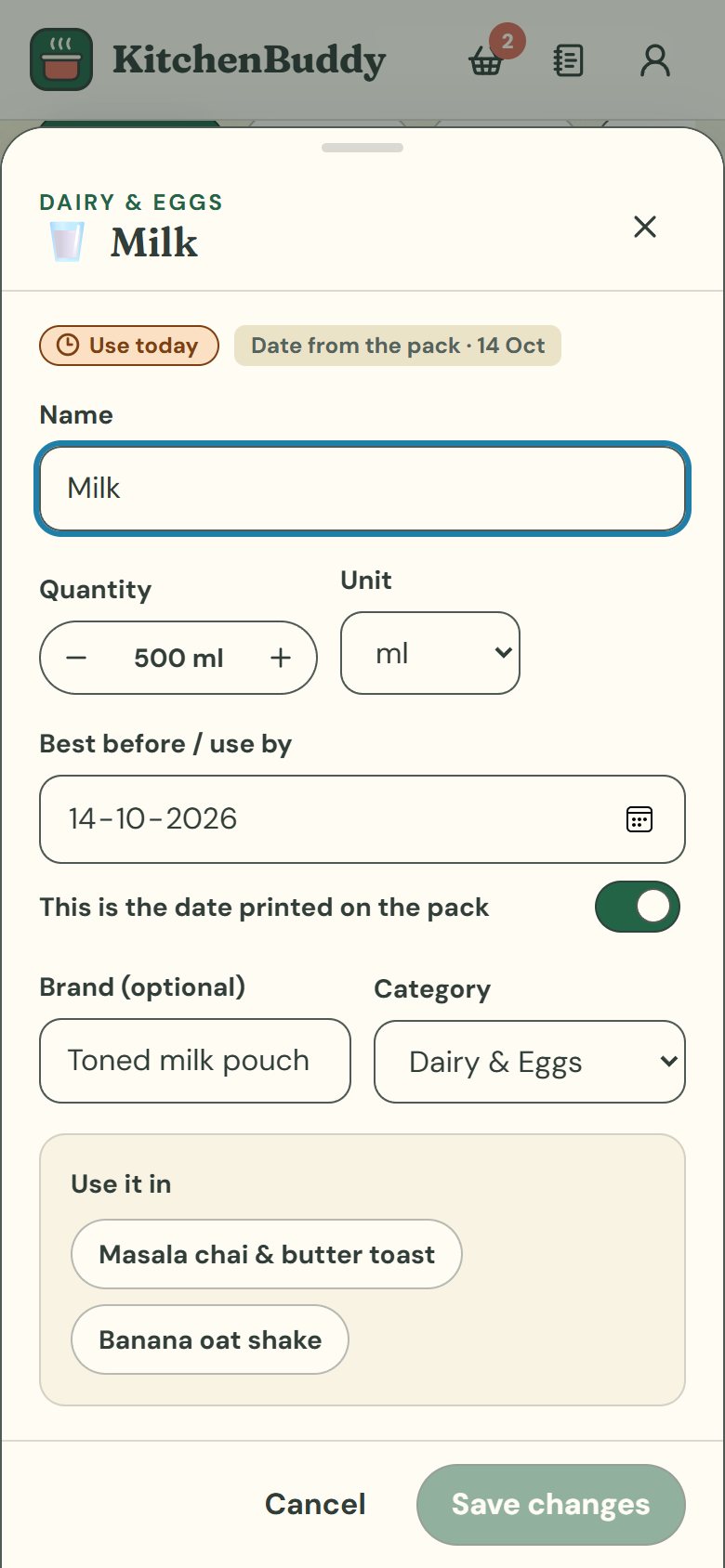
Expiry editing & finishing an item
- Problem
- Dates need correcting, and “delete” hides why food left the pantry.
- Design decision
- A date field with a “printed on the pack” switch, recipes that use the item, and three exits further down: Used it up, Threw it away, Added by mistake — all undoable.
- Interaction rationale
- Only real waste counts as waste; mistakes don’t inflate it.
- Expected benefit
- Honest impact numbers later. Expected, not measured
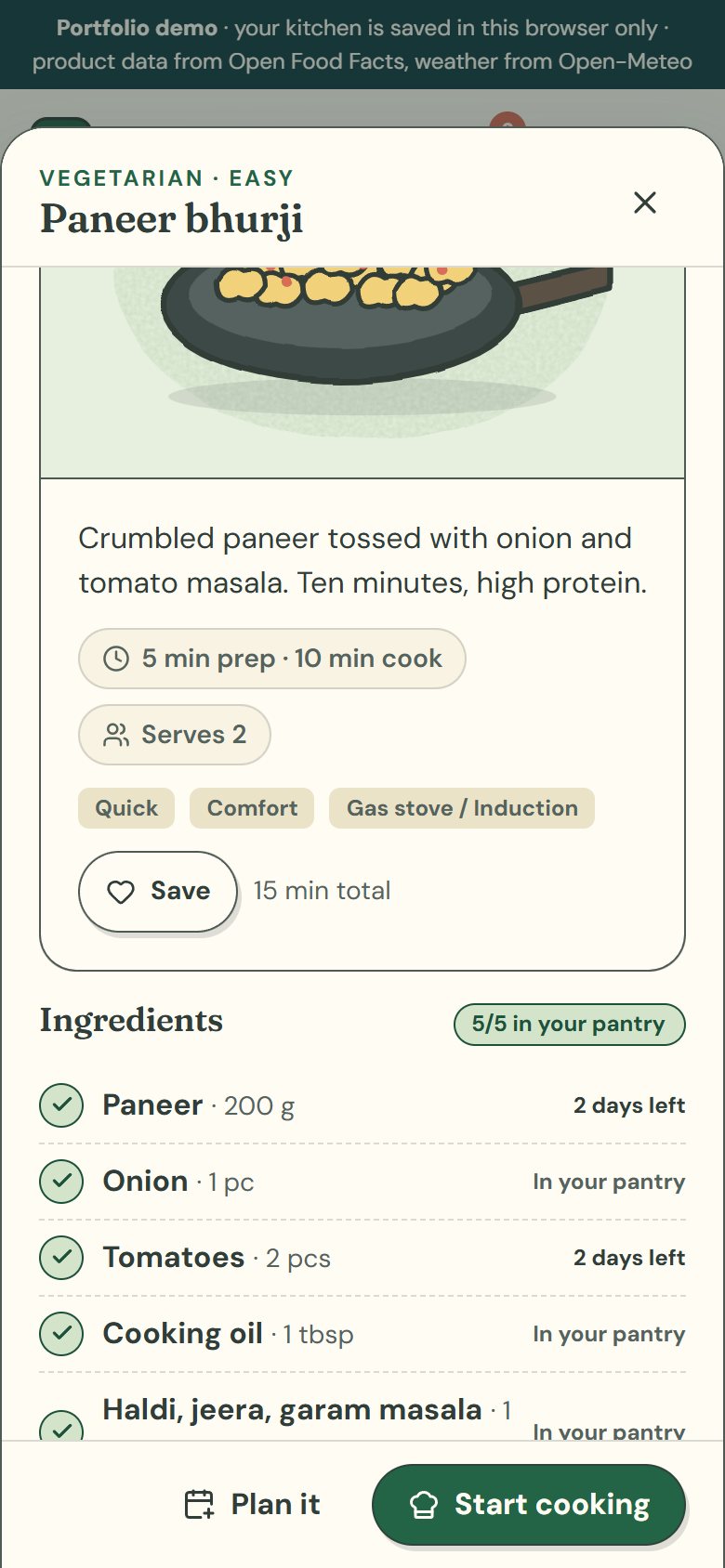
Recipe details
- Problem
- Recipe pages don’t know your kitchen.
- Design decision
- Each ingredient shows have / low / missing / expired / optional.
- Interaction rationale
- The question “can I make this?” is answered on the page itself.
- Expected benefit
- Missing items go to the list in one tap. Expected, not measured
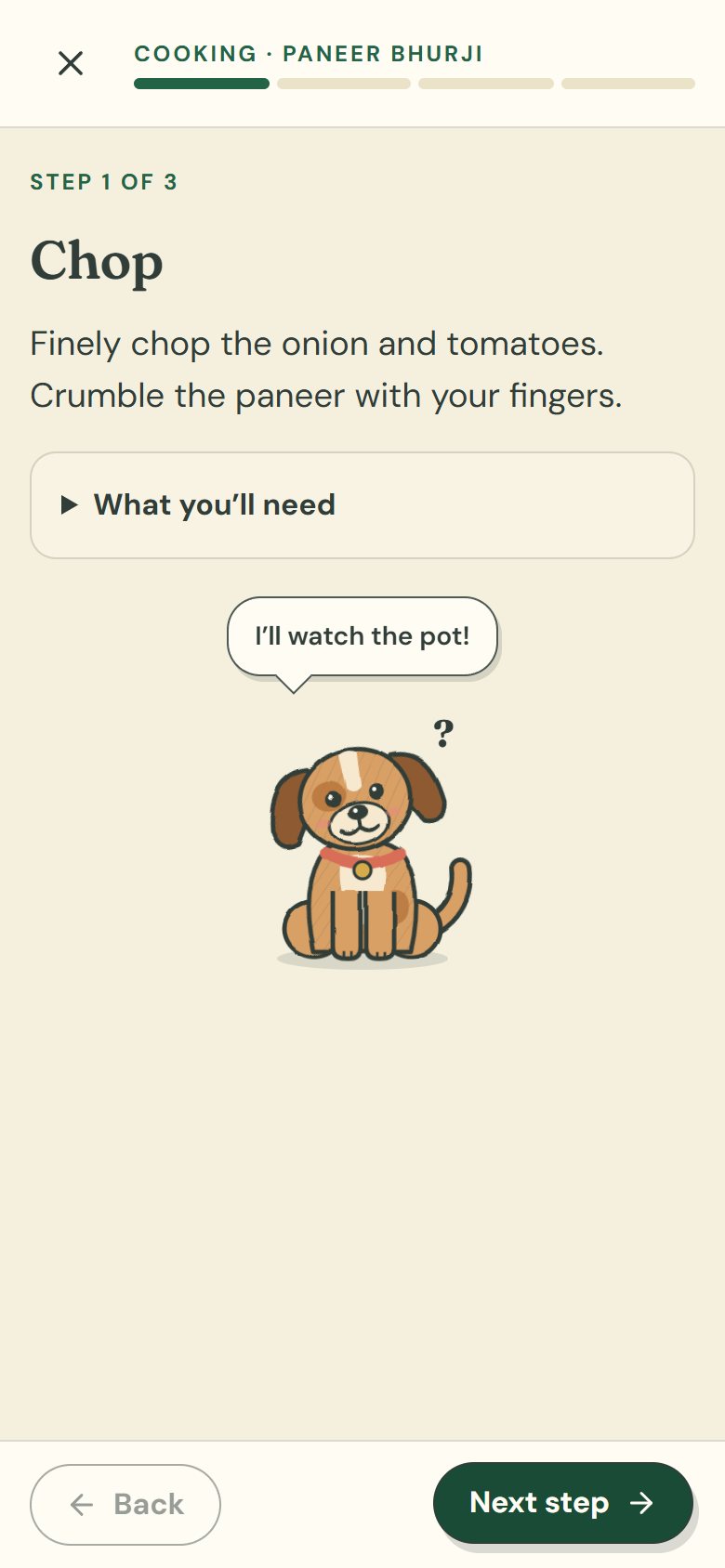
Cooking mode
- Problem
- Scrolling a long page with messy hands.
- Design decision
- One step per screen, big type, optional timers based on timestamps.
- Interaction rationale
- Glanceable from a counter; timers survive the screen locking.
- Expected benefit
- Less to juggle while cooking. Expected, not measured
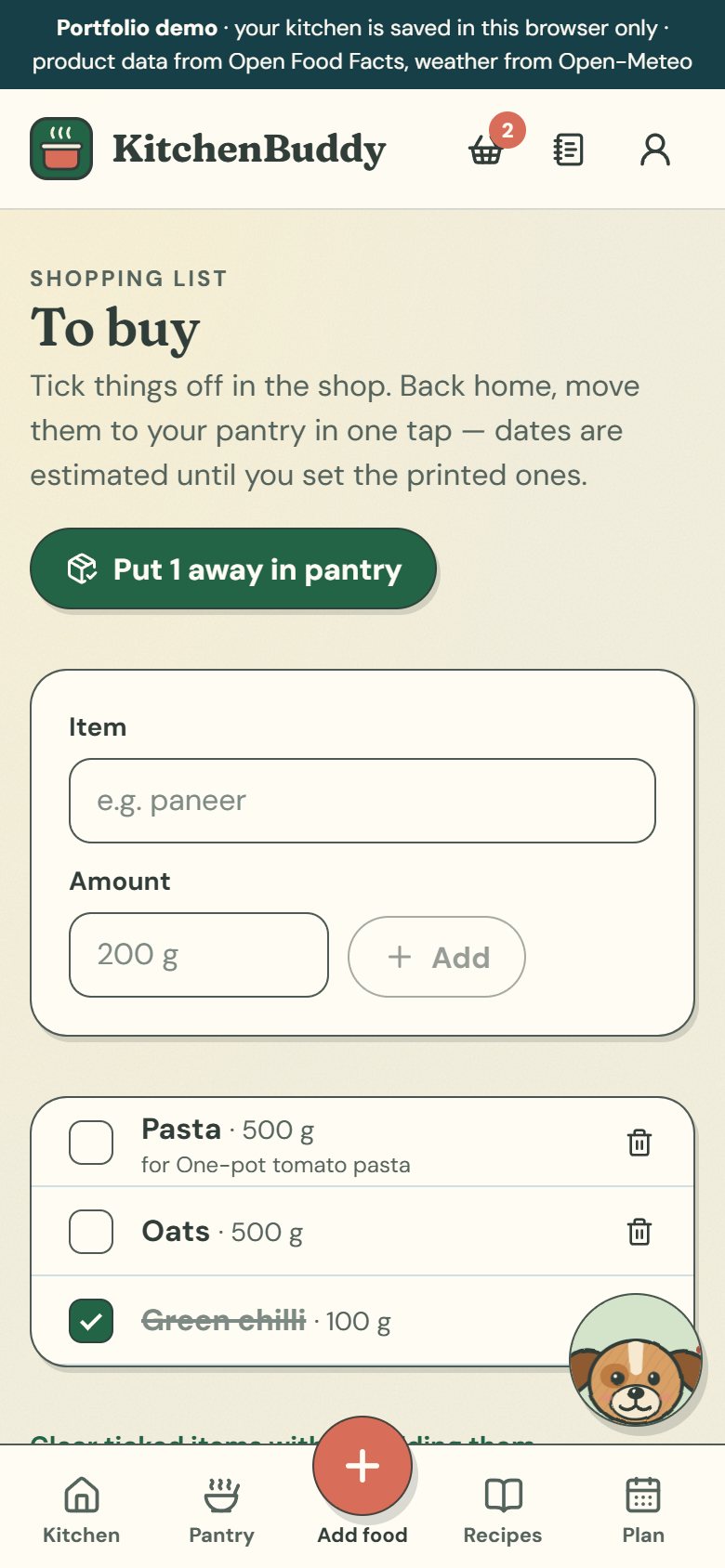
Shopping list
- Problem
- Lists and pantries drift apart.
- Design decision
- Ticked items move into the pantry in one tap, with dates flagged as estimates.
- Interaction rationale
- Closes the loop at the moment of unpacking.
- Expected benefit
- The pantry stays complete after shopping. Expected, not measured
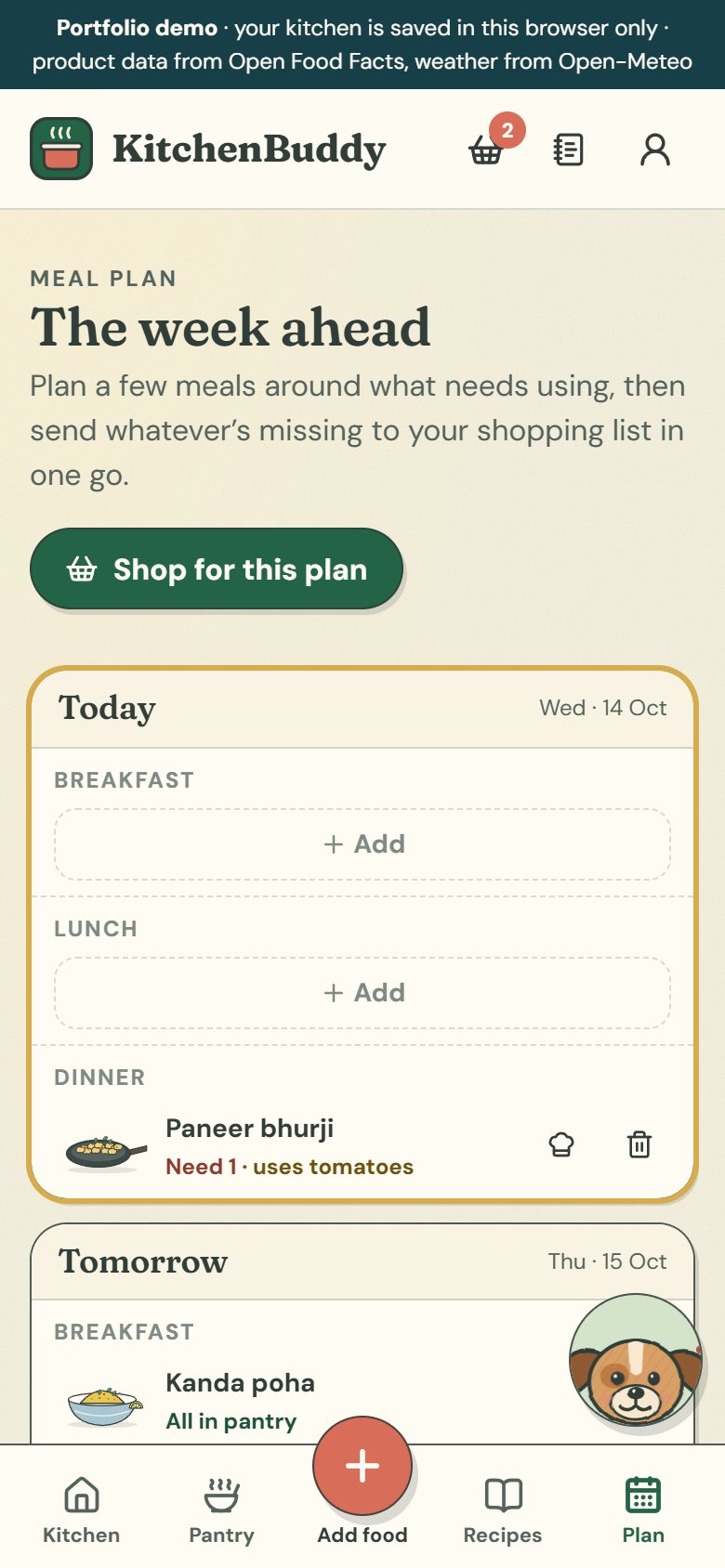
Weekly plan
- Problem
- Plans ignore what’s in stock.
- Design decision
- Each planned meal shows live coverage and what it uses up.
- Interaction rationale
- The plan changes as the pantry changes.
- Expected benefit
- You know what to buy, and only that. Expected, not measured
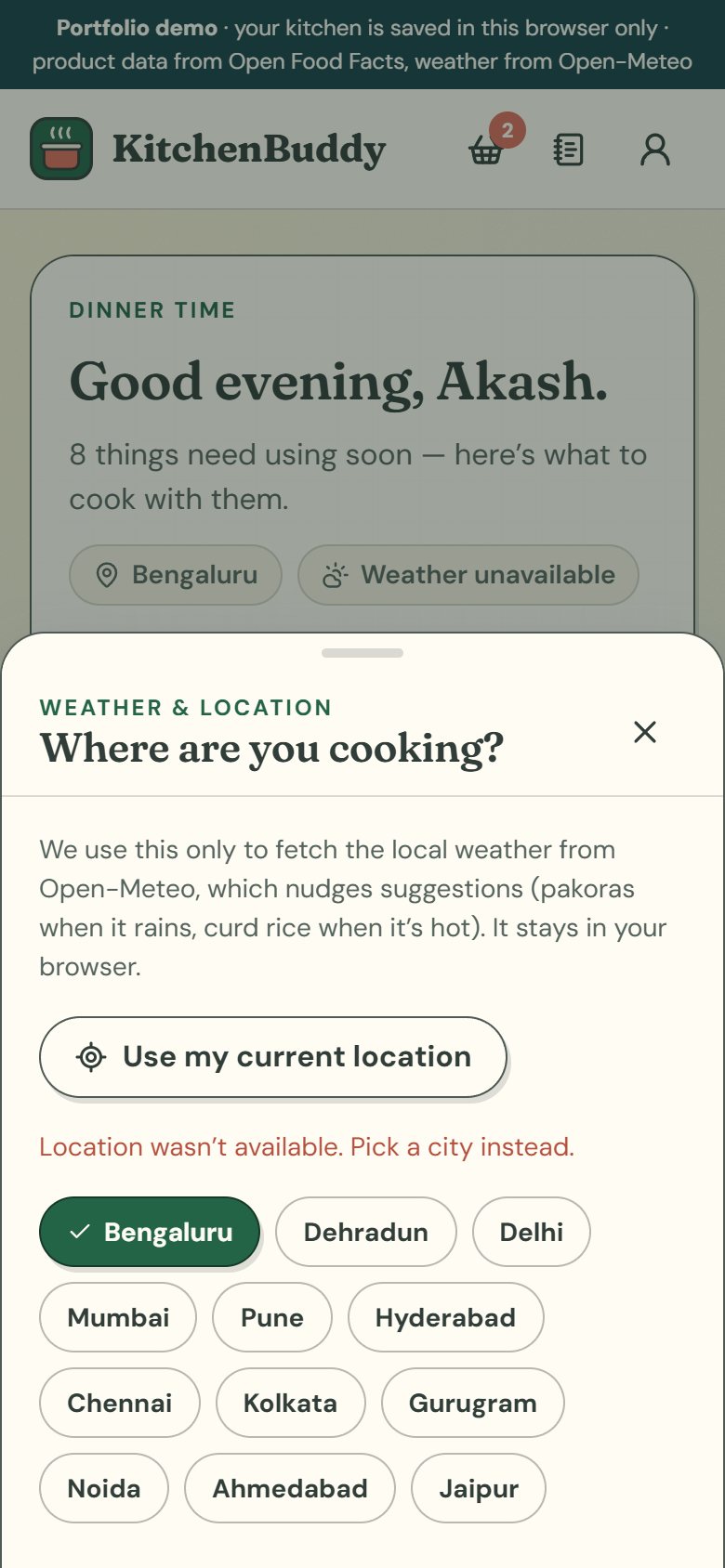
Permission denied (and weather down)
- Problem
- Context features often fail silently.
- Design decision
- Explain why location is asked for; on denial, offer cities and carry on. In this capture the weather request had also failed, so the chip honestly reads “Weather unavailable”.
- Interaction rationale
- Weather is a nice-to-have signal, not a dependency.
- Expected benefit
- Nothing breaks when people say no. Expected, not measured
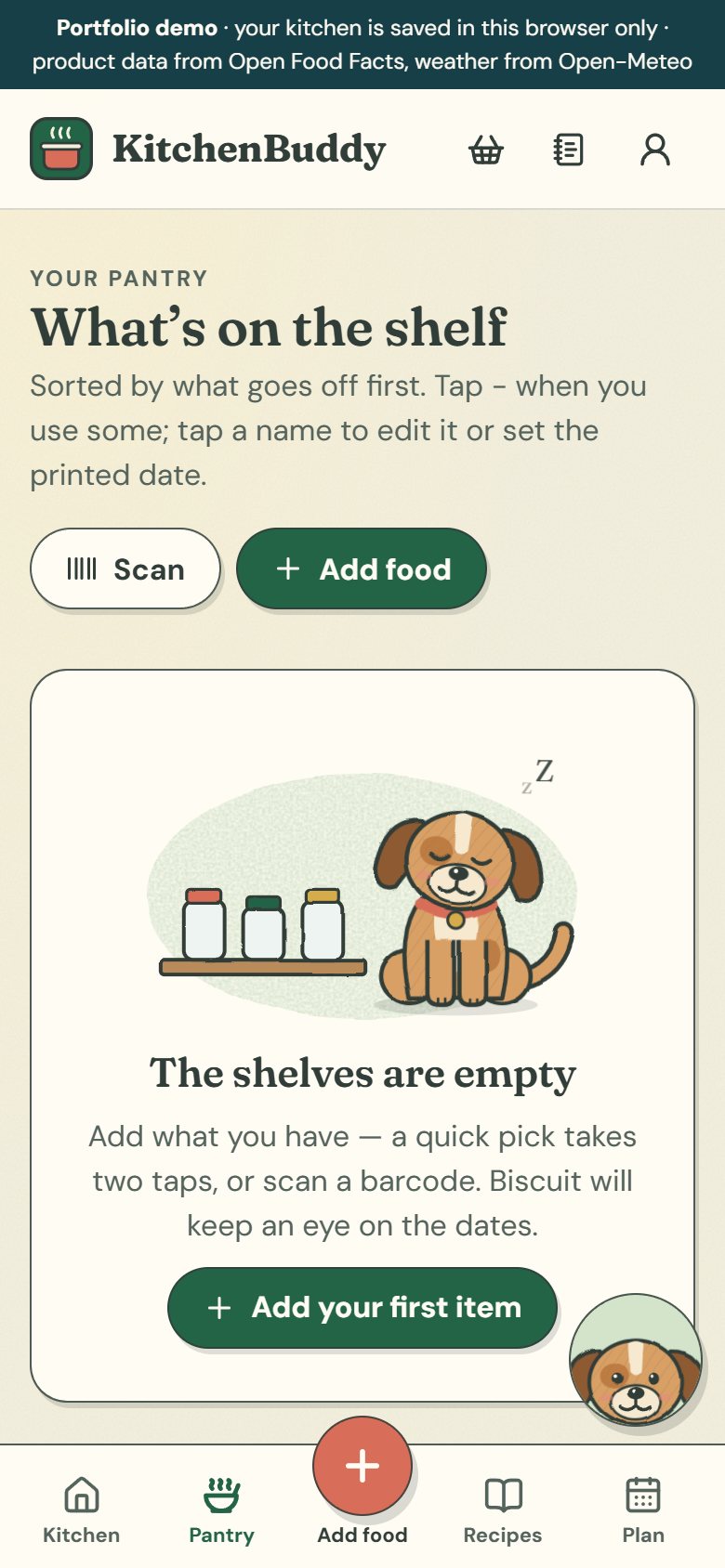
Empty state
- Problem
- A blank screen gives no next step.
- Design decision
- The companion naps by an empty shelf, with one clear action.
- Interaction rationale
- Friendly tone plus a direct path to add something.
- Expected benefit
- First-run users know what to do. Expected, not measured
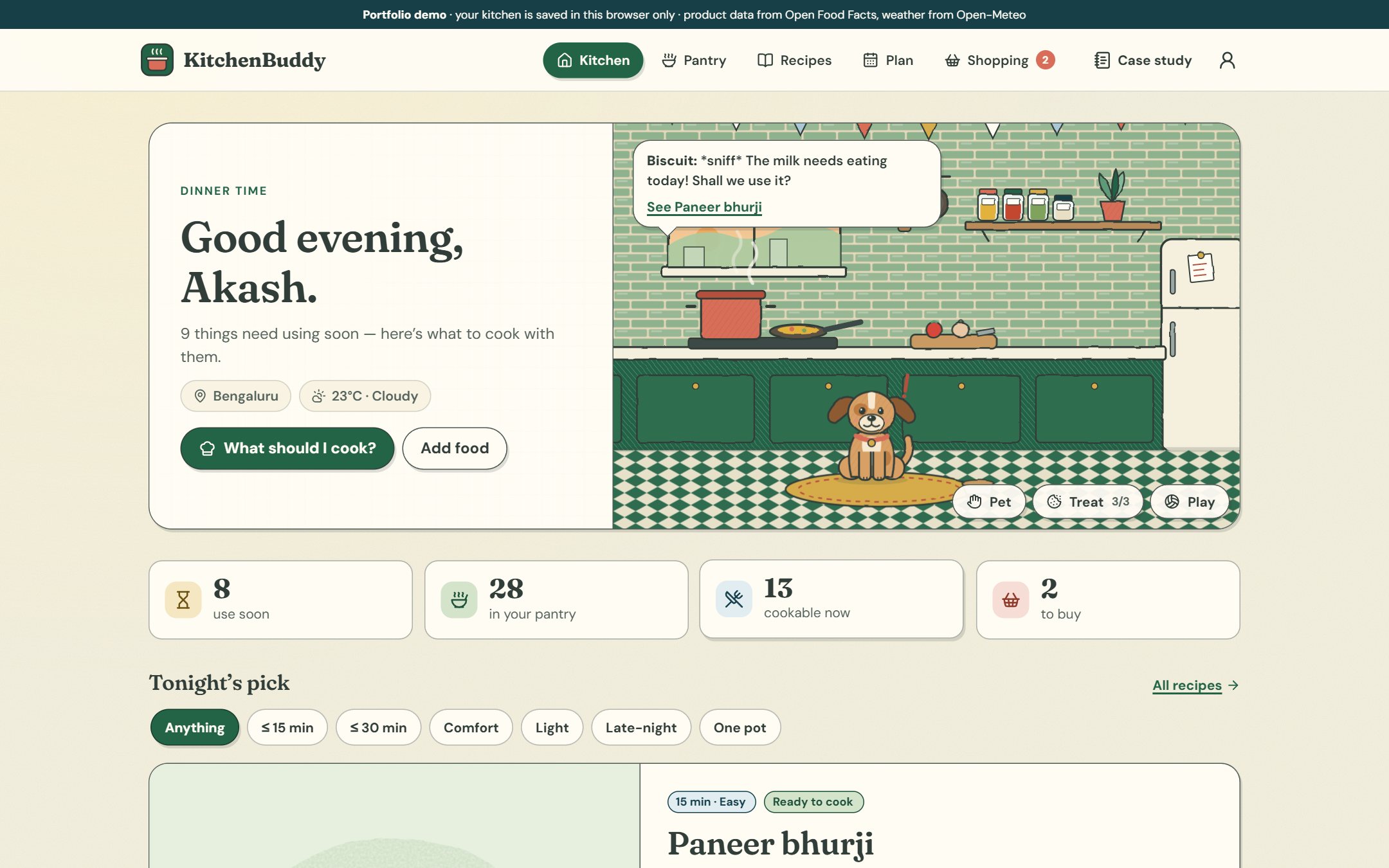
Desktop at 1440 px: the same hierarchy with the kitchen beside the greeting, and the stat tiles as a row.
Verified against the codebase
Chapter 13: Prototyping & implementation
The prototype is a real web app, not a click-through. That made it possible to test the hard parts: units, dates, permissions and failures.
Interface
Next.js 16 app routes: Kitchen, Pantry, Recipes, Plan, Shopping, Profile, Welcome, Case study. Sheets for recipe, item, add-food and cook mode.
State
A small external store read through React’s useSyncExternalStore, persisted to localStorage and synced between tabs. A server snapshot of null avoids hydration mismatches.
Domain logic
Pure functions: ingredient catalogue with whole-word aliases, unit conversion (g/kg, ml/l/tbsp/tsp/cup), local-date freshness, recommendation scoring, deduction proposals.
External data
All called from the browser — the site is fully static. Open Food Facts product lookup (codes validated as 8–14 digits first; the API allows cross-origin requests), Open-Meteo weather and OpenStreetMap Nominatim geocoding. Camera barcode reading uses BarcodeDetector, falling back to ZXing.
| Trade-off | Choice in this build | Why | Cost |
|---|---|---|---|
| Local storage vs. multi-user backend | localStorage | Zero setup for a portfolio demo; no personal data leaves the device | No accounts, no cross-device sync, no sharing with flatmates |
| Product identification vs. expiry extraction | Barcode → product only; expiry entered or estimated | Barcodes don’t encode expiry; the v1 “OCR” was simulated | One extra decision when adding; dates may be estimates |
| Client-side requests vs. a server | Static site: geolocation, weather and product lookup all run in the browser | Hostable anywhere (Netlify Drop) with no backend; permission stays with the user; input is validated before any request | Depends on third-party APIs allowing cross-origin calls; no server-side caching or rate-limit protection |
| Real-time context vs. graceful fallback | Weather is optional (+10 signal) | A failed request must not change what the user sees as true | Fewer weather-based suggestions offline |
| Prototype convenience vs. production reliability | Rule-based ranker, sample data, no tests yet | Fast to change and explain | Needs automated tests before real users |
Verification done (14 Oct 2026)
- TypeScript check, lint and production build pass. Evidence available
- Scripted browser run (Playwright, Microsoft Edge) completed flows A–F and produced every screenshot here. Evidence available
- Live check: barcode 3017620422003 returned a real product from Open Food Facts; unknown codes show an honest “not found”; malformed codes are rejected before any request. Evidence available
- Cooking Paneer bhurji converted “1 tbsp oil” into −15 ml and left spices untouched. Evidence available
Not yet done
- No unit or end-to-end test suite in the repo.
- No testing with people (Chapter 14).
- No formal accessibility audit (contrast, screen readers).
- Not tested on low-end Android hardware.
What has been tested, what hasn’t, and the one real iteration
Chapter 14: Usability testing & iteration
| Task | Scenario | Starting state | Expected outcome | Observe | Anticipated issue | Possible iteration |
|---|---|---|---|---|---|---|
| Find a meal using ingredients already available | It’s 8 pm, you’re tired and don’t want to go out. Find something you can cook with what’s at home. | Home, sample pantry, signed in as a returning user | Opens a recommendation and starts cooking or saves it, without visiting the pantry first | Time to first decision; whether the “why” line is read; back-tracking | The pet bubble competes with “Tonight’s pick” for attention | If participants miss the pick, move the recommendation above the illustration on mobile |
| Add an item to the pantry | You just bought 4 tomatoes. Add them. | Pantry screen | Quick pick → details → Add, with the estimated date accepted or changed | Taps to completion; hesitation at the expiry step; unit errors | Category dropdown truncates (“Veg”) on narrow phones | Hide category behind “More details” for catalogue items |
| Correct an expiry date | The milk packet says it’s good until the day after tomorrow. Fix it in the app. | Pantry with milk estimated to expire today | Opens milk, sets the printed date, saves | Whether users find the item sheet from the name; whether “printed vs estimated” is understood | Item names are the only entry point to editing | Make the whole row tappable while keeping −/+ separate |
| Explain why a recommendation was made | Why do you think the app is suggesting this dish? | Home, Tonight’s pick visible | Participant cites expiring ingredients and pantry coverage | Accuracy of the participant’s explanation vs. the scoring; trust language | Weather chips (“Good for a clear day”) may read as filler on cloudy days | Only show a weather reason when weather actually changed the ranking |
| Complete a recipe and update quantities | Cook the suggested dish, then make sure the app knows what you used. | Recipe sheet | Steps → “I’ve finished cooking” → adjusts at least one amount → Update pantry | Whether users trust proposed amounts; corrections made; errors | Proposed amounts assume the recipe was followed exactly | Remember per-user corrections (e.g. always uses less oil) |
| Add missing ingredients to the shopping list | You want to make rajma chawal this weekend. Make sure you’ll have everything. | Recipes or Plan | “Add N to list” from the recipe, or “Shop for this plan” | Discoverability of both routes; duplicate items | Two routes to the same outcome may confuse | Show “already on your list” in the recipe sheet |
The iteration that did happen: v1 → v2
The first prototype (v1, early October 2026) was reviewed against the product rules written for it: “never invent product information” and “expiry from OCR must be user-verifiable”. That was an expert code and heuristic review, not a usability test. It found the issues below, and v2 was rebuilt to address them.
| v1 issue (evidence: v1 source code) | v2 change |
|---|---|
| Expired food counted as available for recipes | Expired items are excluded; the recipe page says “Yours has expired” |
| Every city used Dehradun’s coordinates for weather | Each city carries its own coordinates; GPS is optional |
| Weather failure silently became “Light rain” | “Weather unavailable”; weather is left out of ranking |
| “OCR” returned today + 7 days whatever the photo | Removed; manual or estimated dates, always labelled |
| “AI” endpoint always returned Aloo Bread Pakora | Removed; transparent rule-based ranking with reasons |
| Unknown barcodes fell back to invented products | An honest “not found”, then add by name |
| Cooking deducted recipe numbers regardless of units; substring matching (“oil” in “boil”) | Unit conversion, whole-word matching, user confirms amounts |
| Stock photos sometimes didn’t match the dish | Illustrated dishes generated from each recipe’s spec |
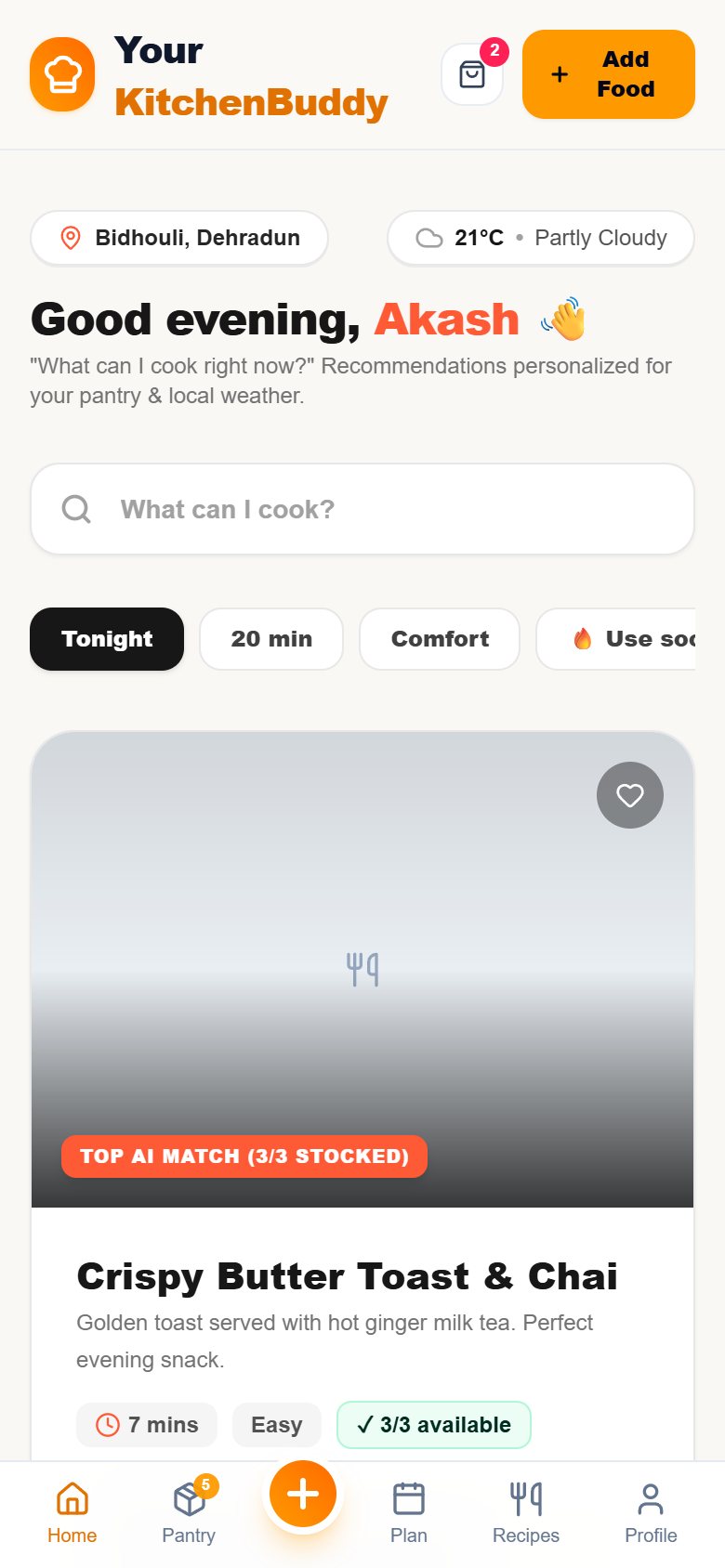
Before — v1. Recommendation hidden behind a failed photo; ‘AI match’ label with no explanation.
After — v2. Context and the most urgent item first; the reason is stated in plain words.
A measurement framework — no results yet
Chapter 15: Outcomes & success metrics
Verified outcomes so far are about the build: the flows run, data persists, failures recover. Nothing yet shows that KitchenBuddy reduces food waste or decision time. Those are what the measures below are for.
| Area | Metric | How measured | Baseline |
|---|---|---|---|
| Usability | Time to identify a suitable meal | Moderated test, Task 1; timestamp from Home load to “Start cooking” / save | Participants’ current method (same task, own tools) in the same session |
| Usability | Task completion & error rate | Six-task protocol (Chapter 14); errors coded from recordings | First round of testing becomes the baseline |
| Usability | Understanding of explanations | Ask participants to explain a pick; compare with the scoring trace | First round |
| Engagement | Pantry update frequency | Count of add / adjust / finish events per active week (needs consented analytics) | Diary study week 1 |
| Engagement | Recipe → cooking conversion | Cook-mode completions ÷ recipe sheet opens | Pilot cohort, first two weeks |
| Food management | Ingredients used before expiry | “Rescued” count vs. “thrown away” count — both already recorded in the prototype (Profile → Your impact) | Self-reported waste log for one week before using the app |
| Food management | Self-reported avoidable waste | Pre/post survey plus weekly diary prompts | Pre-study diary |
| Reliability | Persistence after refresh | Automated check: change data → reload → compare (manual check passed during build) | Must be 100% |
| Reliability | Barcode scan & lookup success | Log scans, decodes, lookups found / not found across real Indian packs | First field test |
| Reliability | Recovery from permission denial / API failure | Scripted test with geolocation denied and network offline | Pass / fail per state |
Already instrumented in the prototype
Profile → Your impact counts meals cooked, ingredients rescued before expiry, items used up and items thrown away. These are stored locally and never sent anywhere; a study would collect them only with consent. See it in the prototype →
Prioritised by value, complexity, risk and uncertainty
Chapter 16: Limitations & roadmap
Current limitations
- Data lives in one browser; clearing site data erases it.
- No accounts, sharing or cross-device sync.
- Dislikes are matched as words; there are no real allergy constraints yet.
- 18 recipes and about 35 catalogue ingredients — a small vocabulary.
- Weights in the ranker are untuned judgement calls.
- Open Food Facts coverage of Indian packs is unverified.
What I won’t claim
- Partnerships or integrations with grocery platforms.
- Any measured reduction in food waste.
- Results from user testing.
| Item | User value | Complexity | Risk | Research uncertainty | When |
|---|---|---|---|---|---|
| Contextual inquiry + diary study with 6–8 target users | High | Low | Low | Reduces it | Now |
| Moderated usability test of the six core tasks | High | Low | Low | Reduces it | Now |
| Explicit allergies as hard constraints (separate from dislikes) | High | Medium | High if wrong | Low | Now |
| Accounts + cross-device sync (Supabase schema already drafted) | High | Medium | Privacy | Medium | Next |
| Household sharing for flatmates | Medium–High | High | Conflicting edits | High | Next |
| Expiry-date OCR with mandatory confirmation | Medium | High | Wrong dates | High | Next |
| Variety / repetition control in ranking | Medium | Low | Low | Medium | Next |
| LLM-written explanations grounded in the scoring trace | Medium | Medium | Hallucination | High | Later |
| Receipt / order import | Medium | High | Depends on access | High | Later |
| Grocery-platform integrations (only if official APIs exist) | Unknown | High | Partnership-dependent | Very high | Later |
| Hindi and regional-language support | Medium | Medium | Low | Medium | Later |
What this project taught me
Chapter 17: Reflection
I started KitchenBuddy thinking I was designing a pantry app. Somewhere around the third version of the home screen I realised I was really designing for a moment: you’re tired, it’s evening, and you’re standing in front of an open fridge. “What should I cook?” sounds like a small question, but it carries memory, freshness, money, energy and whatever pans you happen to own. Most of my design work turned out to be deciding which of those to show, and when to stay quiet.
My biggest bet is about visibility. I believe that seeing “paneer · 2 days left” inside a meal suggestion will change what someone cooks, in a way that a red list of expiring items never would. I care about this idea, which is exactly why I haven’t claimed it works. Testing it is the first thing I want to do next.
The most humbling part was looking back at my own first version. It had a lot of “AI”: a recommendation that always returned the same recipe, an OCR that always said “seven days”, products that appeared out of nowhere. It looked impressive in a demo and wasn’t true. Replacing all of that with a simple ranker that explains itself made the app feel less magical, but I trust it more, and I think users will too. Any smarter model I add later now has honest ground to stand on.
I also learned to slow the app down on purpose. After cooking, it would have been easy to quietly subtract ingredients. Instead it asks, “here’s what we think you used. Is that right?” It costs one extra tap, but the pantry stays something you believe. Wherever the app guesses, I wanted you to be able to see the guess and fix it.
Finally, the hardest problems weren’t on the screen at all. Barcodes that don’t know expiry dates, tablespoons that have to become millilitres, “today” quietly turning into “yesterday” because of a timezone: that’s where a food app earns or loses trust. Designing well here mostly meant being honest when the data wasn’t there.
Design contribution
A pantry-first decision flow that explains its recommendations from real data, treats freshness as a reason to cook rather than an alarm, and closes the loop between cooking, shopping and the pantry. It is delivered as a working, honest prototype.
Next most valuable step
A one-week diary study and a six-task usability test with 6–8 hostel, PG and young-professional cooks, to find out whether recommendations driven by freshness change what they cook.
Sources & evidence
References
- With 783 million people going hungry, a fifth of all food goes to waste (coverage of the UNEP Food Waste Index Report 2024). UN News, United Nations. 27 March 2024. news.un.org/en/story/2024/03/1148036Global modelled estimates for 2022, co-authored by UNEP and WRAP. Used for scale only. The UNEP report page itself could not be retrieved during writing (server errors), so figures are quoted as reported by UN News.
- Household food & drink waste: A product focus. WRAP. 22 November 2016 (datasets from WRAP’s 2012 UK household study). wrap.ngo/resources/report/household-food-drink-waste-product-focusUK households, diary and waste-composition data. Old and geographically distant from the target users; used only to frame hypotheses, never as evidence about Indian households.
- Spaghetti soup: The complex world of food waste behaviours. Quested, T.E., Marsh, E., Stunell, D. & Parry, A.D. — Resources, Conservation and Recycling, 79, 43–51. October 2013. doi.org/10.1016/j.resconrec.2013.04.011Peer-reviewed. Only the bibliographic record and published summary were reviewed; the full text should be read before quoting further.
- SuperCook Recipe by Ingredient — App Store listing. AMR Systems LLC. Accessed 14 October 2026. apps.apple.com/us/app/supercook-recipe-by-ingredient/id1477747816Developer’s own description (marketing copy).
- NoWaste: Food Inventory List — App Store listing. KH Creations ApS. Accessed 14 October 2026. apps.apple.com/us/app/nowaste-food-inventory-list/id926211004Developer’s own description (marketing copy).
- KitchenPal Shared Grocery List — App Store listing. iCuisto Pte. Ltd.. Accessed 14 October 2026. apps.apple.com/us/app/kitchenpal-shared-grocery-list/id1084982489Developer’s own description (marketing copy).
- Samsung Food: Meal Planner — App Store listing. Whisk food / Foodient Ltd. Accessed 14 October 2026. apps.apple.com/us/app/samsung-food-meal-planner/id1133637674Developer’s own description; free vs. Samsung Food+ split as listed.
- Mealime Meal Plans & Recipes — App Store listing. Mealime Meal Plans Inc. Accessed 14 October 2026. apps.apple.com/us/app/mealime-meal-plans-recipes/id1079999103Listing states the service shuts down on 21 October 2026.
- Too Good To Go: End Food Waste — App Store listing. Too Good To Go ApS. Accessed 14 October 2026. apps.apple.com/us/app/too-good-to-go-end-food-waste/id1060683933Developer’s own description. Availability in India not verified.
- Blinkit — Our businesses. Eternal Ltd. Accessed 14 October 2026. eternal.com/our-businesses/blinkitParent company description of the quick-commerce service.
All external sources were checked on 14 October 2026. Product feature descriptions come from developers’ own listings and may change. Implementation claims refer to this codebase on the same date.